



Short answer: Most Bodycam crashes come from the graphics card side: an old driver, an overlay, an overclock or settings too high for your VRAM. Update your graphics driver, close overlays (Discord, Xbox Game Bar, MSI Afterburner), verify the game files in Steam and cap your FPS. If the game stopped launching after update v0.9 "The Dead & Damned" (November 13, 2026), it is usually the new Easy Anti-Cheat: launch from your Steam Library, verify the files and reboot once. Can't play with friends? That is not a bug on your side: the party system is not in the game yet.
Pick your hardware and we compare it with the official Bodycam requirements.
Official Bodycam PC requirements
| Minimum | Recommended | |
|---|---|---|
| OS | Windows 10/11 | Windows 10/11 |
| CPU | AMD Ryzen 7 3700X, Intel Core i7-9700K | AMD Ryzen 7 3800X, Intel Core i7-10700K |
| RAM | 8 GB | 16 GB |
| GPU | AMD Radeon RX 5700 (8 GB), NVIDIA GeForce RTX 2070 (8 GB) | AMD Radeon RX 6600 XT (8 GB), NVIDIA GeForce RTX 3060 (12 GB) |
| Storage | 50 GB | 50 GB |
Source: official Bodycam website. Results are estimates based on relative hardware performance.
Bodycam problems at a glance
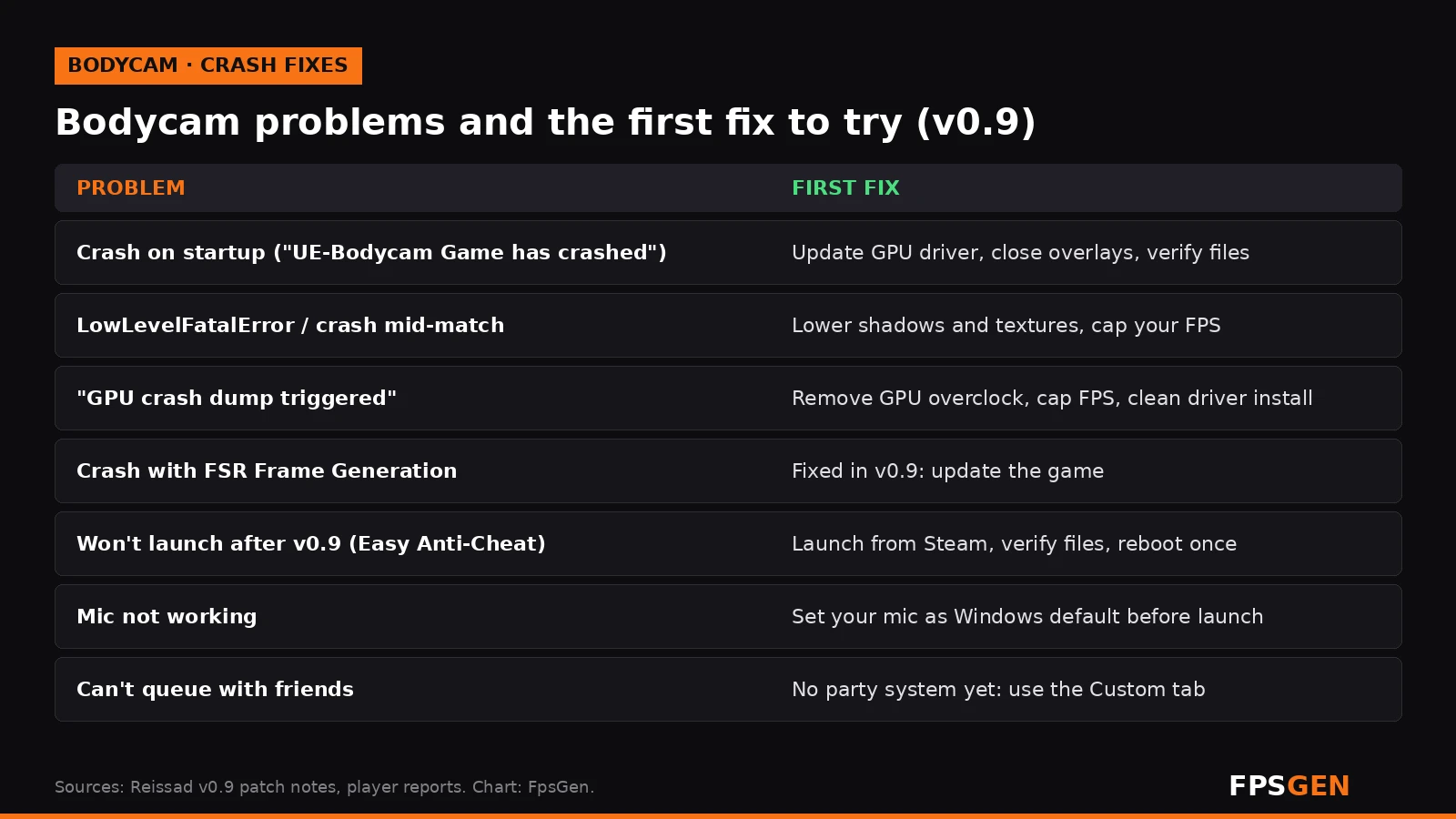
Before anything else, check that your PC meets the minimum: an RTX 2070 or RX 5700 (8 GB), a Core i7-9700K or Ryzen 7 3700X, 8 GB of RAM and Windows 10/11 64-bit. Bodycam is a heavy Unreal Engine 5 game, and many crashes on older cards simply come from running below the minimum. Full specs: Bodycam PC System Requirements and Best Settings, or check your PC on Can I Run Bodycam?
1. Bodycam crashes on startup ("UE-Bodycam Game has crashed")
If the game closes on the splash screen or right after the menu, with the Unreal Engine crash window:
- Update your graphics driver from NVIDIA, AMD or Intel directly: How to Update GPU Drivers.
- Close overlays for one session: Discord, Xbox Game Bar, MSI Afterburner / RivaTuner, GeForce or Radeon overlays and RGB software.
- Verify the game files: Steam Library, right-click Bodycam, Properties, Installed Files, Verify integrity of game files.
- Antivirus: if it quarantined a game file, restore it and add the Bodycam folder as an exclusion.
- Run Bodycam.exe as administrator once, and disable fullscreen optimizations in the file's Compatibility tab.
- Remove any GPU or CPU overclock, including factory "OC mode" tools, and test again.
Still crashing on launch? Some players fix DirectX 12 startup crashes with the -dx11 launch option (Steam, Bodycam, Properties, Launch Options). This is a player workaround, not an official fix: if the game does not start or looks worse with it, remove it.
2. LowLevelFatalError or crash in the middle of a match
LowLevelFatalError is a generic Unreal Engine error. In Bodycam it is usually linked to the graphics card: running out of VRAM, overheating or an unstable driver.
- Lower Textures and Shadows one step. On cards with less than 8 GB of VRAM, use Medium textures.
- Turn off volumetric fog or lower it, if the crash happens on one map (Village, for example).
- Cap your FPS. Uncapped FPS with V-Sync off can push the card into driver timeouts. Cap a few FPS below your refresh rate: FPS Cap Calculator.
- Check your temperatures while playing: What Is a Normal GPU Temperature?
- If it only happens on one map, verify the game files again after updating your driver.
3. "GPU crash dump triggered"
Players report this error after 15 to 30 minutes of play. It means the graphics driver stopped responding.
- Remove any GPU overclock or undervolt, including the one from MSI Afterburner.
- Cap your FPS and lower shadows and ray tracing / Lumen-heavy settings.
- Do a clean driver install: uninstall the driver with DDU (Display Driver Uninstaller) in safe mode, then install the latest driver.
- Check temperatures and make sure your power supply is strong enough for your card.
4. Crash with FSR Frame Generation
Reissad fixed a crash tied to FSR Frame Generation in v0.9. If you turned Frame Generation off because of crashes, update the game in Steam and you can try it again. If it still crashes, turn Frame Generation off and keep FSR, DLSS or XeSS upscaling in Quality mode.
5. Bodycam won't launch after v0.9 (Easy Anti-Cheat)
Update v0.9 added Easy Anti-Cheat to PC matches. On the first start after the update, the game may install Easy Anti-Cheat, ask for Windows permission and take a little longer to reach the menu.
- Always launch from your Steam Library, so Easy Anti-Cheat starts with the game.
- Accept the Windows permission prompt if it appears.
- Verify the game files, then restart your PC once after the Easy Anti-Cheat install.
- If your antivirus blocks it, add Bodycam.exe and the EasyAntiCheat folder in the game directory as exclusions.
- Close overlays (Discord, GeForce Experience) for a test: they can block the anti-cheat service.
Steam Deck and Linux: Reissad has not said whether Easy Anti-Cheat works under Proton. If Bodycam worked on your Steam Deck before v0.9 and stopped after, the anti-cheat is the likely reason.
6. Stutter in the first matches
Stutter after an update or a driver update is usually shader compilation. It gets better after a few matches. Install the game on an SSD: on a hard drive, the stutter lasts longer. More tips: How to Increase FPS on PC.
7. Mic not working or you can't hear other players
Voice chat was rebuilt in v0.8 and uses your Windows default microphone.
- Set your mic as the default device in Windows Sound settings before you launch the game.
- In Windows Privacy, allow apps to use the microphone.
- Check that you did not mute a player by mistake: individual muting was added in a v0.8 patch.
- Use headphones: with speakers, the game's sound can loop back into your mic.
8. Can't play with friends or queue as a party
This is not a bug on your PC. Reissad dropped its old multiplayer provider and is rebuilding the party system on Epic Online Services. In v0.9 it is still missing: Quick Play and the Server Browser are solo queue only. To play with friends, create a game from the Custom tab, or create a Zombies game directly. Reissad calls the party system its top priority but has not given a date.
Still crashing? Send your crash log to Reissad
If a crash keeps happening at the same moment, the crash files are in:
C:\Users\YourName\AppData\Local\Bodycam\Saved\Crashes
Open the newest folder and send the CrashContext.runtime-xml file, with your graphics card, processor and driver version, on the official Bodycam Discord or the game's Steam discussions.
Related
- Bodycam Wallpapers for Phone and PC
- Bodycam PC System Requirements and Best Settings
- Can I Run Bodycam?
- How to Update GPU Drivers
- FPS Cap Calculator
- What Is a Normal GPU Temperature?
FAQ
Why does Bodycam keep crashing?
Most crashes come from the graphics card side: an old driver, an overlay, an overclock, overheating, or settings too high for your VRAM. Update the driver, close overlays, verify the game files and cap your FPS.
How do I fix LowLevelFatalError in Bodycam?
Lower textures and shadows, cap your FPS, check your GPU temperature and verify the game files. It is a generic Unreal Engine error, usually linked to the graphics card.
Why won't Bodycam launch after the Zombies update?
Update v0.9 added Easy Anti-Cheat. Launch the game from your Steam Library, accept the Windows prompt, verify the files and restart your PC once.
Why can't I party up with friends in Bodycam?
The party system is not in the game yet. Reissad is rebuilding it on Epic Online Services. For now, play with friends through the Custom tab or a Zombies game.
Did v0.9 fix the FSR Frame Generation crash?
Yes. The v0.9 patch notes list a fix for a crash tied to FSR Frame Generation.
Where are the Bodycam crash logs?
In C:\Users\YourName\AppData\Local\Bodycam\Saved\Crashes.
Sources: Bodycam v0.9 "The Dead & Damned" patch notes (Easy Anti-Cheat, FSR Frame Generation crash fix, party system status); Bodycam Hub (v0.8 errors, voice chat, Fatal Error); Bodycam Game Wiki (crash fixes, crash log folder, Easy Anti-Cheat first launch); How To Video Game (-dx11 workaround); player reports on YouTube ("GPU crash dump triggered" after 20 minutes). Last checked November 16, 2026.
Gaming writer at FpsGen. Guides and reviews are built on official sources, patch notes and real player data.
Comments
No comments yet. Start the conversation.