


Short answer: First check whether the servers are down: during server trouble, ROB RUN freezes on Compiling Shaders or the loading screen even on a perfect PC. If the servers are fine, restart Steam and the game, update your graphics driver and verify the game files in Steam. If you see an error code (E-0102, E-0501...), use the table below: each code has its own fix.
Pick your hardware and we compare it with the official ROB RUN requirements.
Official ROB RUN PC requirements
| Minimum | Recommended | |
|---|---|---|
| OS | Windows 10 or later | Windows 10 or later |
| CPU | Intel Core i5-6600K or AMD Ryzen R5 1600 processor | Intel Core i5-9600K or AMD Ryzen 5 3600 processor |
| RAM | 12 GB | 16 GB |
| GPU | NVIDIA GeForce GTX 1050 Ti or AMD Radeon RX 580 or Intel Arc A380 | NVIDIA GeForce RTX 2070 or AMD Radeon RX 5700 XT or Intel Arc B570 |
| Storage | 20 GB | 20 GB |
Source: official ROB RUN website. Results are estimates based on relative hardware performance.
1. Stuck on "Compiling Shaders" or the loading screen
This is the most common ROB RUN problem since the Early Access launch on November 4, 2026. The screen says "Compiling Shaders", but the game is also waiting for the server. When the servers struggle, the bar stops at 0% or 50% and never moves. Kefir reported DDoS attacks on its servers on November 6 and 7, when most of these reports came in.
How to fix it:
- Check the servers first. Look at Kefir's Discord and the in-game player count. If the servers are down, no fix on your PC will help: wait.
- Fully restart the game and Steam. Kefir's own advice during the outages: restart the game so it picks up the current server setup.
- Verify the game files: Steam Library, right-click ROB RUN, Properties, Installed Files, Verify integrity of game files.
- Update your graphics driver (NVIDIA, AMD or Intel).
- The first launch is slower: shaders are really compiled on the first start. Give it a few minutes before you force-close the game.

2. ROB RUN crashes on startup
If the game closes before or right after the menu:
- Check that your PC meets the minimum: Windows 10 64-bit, 12 GB of RAM, a GTX 1050 Ti or RX 580, an i5-6600K or Ryzen 5 1600, DirectX 11 and 20 GB of free space. Full specs: ROB RUN PC System Requirements, or check your PC on Can I Run ROB RUN?.
- Older CPUs: players with old processors (such as 3rd-gen Intel Core) report crashes on launch. Their CPUs are below the minimum, which is the likely cause.
- Close other apps and overlays (Discord, GeForce Experience, Xbox Game Bar), then restart your PC.
- Update your graphics driver and verify the game files.
- Launch from your Steam Library only, so Easy Anti-Cheat starts with the game.
- Antivirus: if your antivirus quarantined a game file, restore it and add ROB RUN as an exclusion. Pause the antivirus only for a short test, never for good.
Steam Deck and Linux: players report that Easy Anti-Cheat blocks the game under Proton, so it may not work there.
3. Can't enter your house or plot
Players reported "failed to enter location" errors from November 7 while the servers were unstable. There is no separate fix: wait for the servers to recover, then fully restart the game. Kefir also warned that it may restart servers without notice for stability fixes, so do not carry large amounts of cash when the servers are shaky.
4. ROB RUN error codes and how to fix them
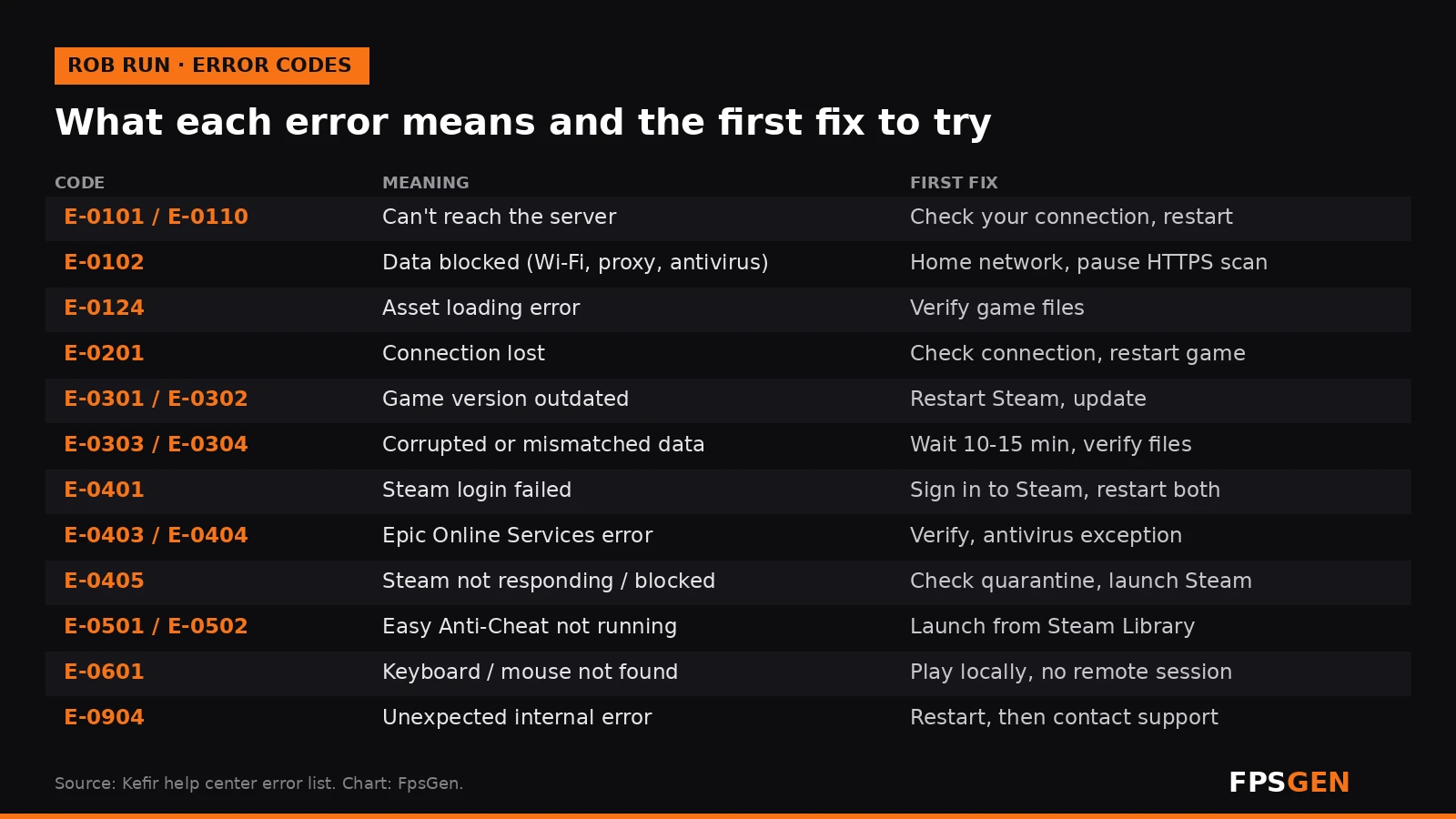
| Code | What it means | How to fix it |
|---|---|---|
| E-0101 / E-0110 | The game cannot reach the server | Check your internet; make sure websites load; restart |
| E-0102 | Game data blocked, often by hotel or school Wi-Fi, a proxy or antivirus HTTPS scanning | Use a home network, turn off the proxy or VPN, pause HTTPS scanning |
| E-0124 | Internal asset loading error | Verify the game files |
| E-0201 | Connection to the server lost | Check your connection and restart the game |
| E-0301 / E-0302 | Game version is outdated | Close the game, restart Steam, let it update |
| E-0303 / E-0304 | Corrupted or mismatched data | Wait 10 to 15 minutes, turn off the proxy, verify files, update |
| E-0401 | Steam login failed | Make sure Steam is online and signed in; restart Steam and the game |
| E-0403 / E-0404 | Epic Online Services sign-in problem | Verify files, add an antivirus exception, restart your PC |
| E-0405 | Steam not responding, or antivirus blocked a file | Check the antivirus quarantine, open Steam, verify files, start from the Library |
| E-0501 / E-0502 | Easy Anti-Cheat not running, damaged or blocked | Launch from Steam, pause the antivirus briefly, verify files, restart |
| E-0601 | Keyboard or mouse not detected | Play on the PC itself, not through a remote or cloud session |
| E-0904 | Unexpected internal error | Restart; if it keeps happening, send the error text to support |
5. Lag and rubber-banding
If the game runs but players teleport or your actions are delayed, it is a network problem, not your PC. ROB RUN only has Europe and US East servers, so players in Asia, Oceania and South America often get high ping. Use a wired connection and close downloads. If your FPS drops instead, especially when you move the mouse, see ROB RUN Best PC Settings.
Still not working? Contact Kefir support
Send Kefir support a short description of the problem, when it happened, a screenshot or video, your PC specs and your UID. To find your UID: press Esc, it is under your character name.

Related
- ROB RUN Best PC Settings
- ROB RUN PC System Requirements
- Can I Run ROB RUN?
- How to Increase FPS on PC
FAQ
Why is ROB RUN stuck on Compiling Shaders?
Usually because the servers are down or overloaded: the game waits for the server on that screen. Check Kefir's Discord. If the servers are fine, restart the game and Steam and verify the game files.
How do I fix ROB RUN crashing on startup?
Check that your PC meets the minimum specs, update your graphics driver, verify the game files in Steam, close overlays and launch the game from your Steam Library so Easy Anti-Cheat starts.
What is error E-0501 in ROB RUN?
Easy Anti-Cheat is not running or was blocked. Launch the game from Steam, pause your antivirus for a short test, verify the files and restart.
What does E-0102 mean in ROB RUN?
Game data is being blocked, usually by public Wi-Fi, a proxy or VPN, or antivirus HTTPS scanning. Switch to a home network or turn those off.
Does ROB RUN work on Steam Deck?
Players report that Easy Anti-Cheat blocks it under Proton, so it may not work on Steam Deck or Linux.
Sources: Kefir's help center (troubleshooting and error codes) and Discord notices (November 6 to 8, 2026), as summarised by Windows Forum and robrun.fyi; requirements from ROB RUN on Steam. Last checked November 15, 2026.

Gaming writer at FpsGen. Guides and reviews are built on official sources, patch notes and real player data.
Comments
No comments yet. Start the conversation.