

"Is my CPU bottlenecking my GPU?" is one of the most asked PC gaming questions, and one of the most misunderstood. Every PC has a bottleneck: some part always sets the limit. What matters is which part, in which game, and whether it actually hurts your experience. This guide shows you how to find out in two minutes and what to do about it.
Quick answer: play a game with an FPS counter that shows GPU usage. If the GPU stays at 95 to 100%, your graphics card is the limit, which is normal and fine. If GPU usage stays well below 90% while your FPS is lower than you want, your processor is holding the graphics card back. Our free FPS Estimator also tells you which part limits your PC in each game.
What a bottleneck really is
To draw a frame, the processor first prepares it (game logic, physics, AI, telling the graphics card what to draw), then the graphics card renders it. Your FPS is set by whichever of the two is slower:
- If the CPU can prepare 150 frames per second but the GPU can only render 90, you get 90 FPS and the GPU is the bottleneck.
- If the GPU could render 150 but the CPU can only prepare 70, you get 70 FPS and the CPU is the bottleneck.
So a bottleneck isn't a defect. It just tells you which part to look at when you want more FPS.
GPU bottleneck vs CPU bottleneck
| GPU bottleneck | CPU bottleneck | |
|---|---|---|
| GPU usage | 95 to 100% | Well under 90% |
| Lowering graphics settings | FPS goes up a lot | FPS barely changes |
| Higher resolution | FPS goes down | FPS barely changes |
| Typical feel | Smooth, just lower FPS | Stutter, uneven frame times, low 1% lows |
| Is it a problem? | Usually not: it means your card is fully used | Yes, if FPS is below what you want |
A GPU bottleneck is the normal, healthy state for a gaming PC: you are getting everything out of the part that matters most for games. A CPU bottleneck is the one worth fixing, because you paid for graphics performance you can't use.
How to check if your CPU is the bottleneck
1. Watch GPU usage while you play
Turn on an overlay that shows GPU usage and FPS: Steam's performance monitor, the NVIDIA app (Alt + R), AMD Software (Ctrl + Shift + O) or the Xbox Game Bar. Our guide How to Show FPS in Any PC Game shows each one.
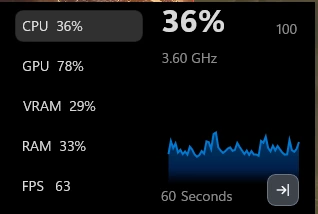
Play for a few minutes in a busy part of the game (a city, a big fight, a full multiplayer match), not a menu or an empty area.
- GPU at 95 to 100%: GPU bottleneck. Your processor is fine for this game.
- GPU at 60 to 90% and FPS below your target: likely CPU bottleneck.
- GPU low but FPS already at your cap (V-Sync, a frame limit or your monitor's refresh rate): no bottleneck, the cap is doing its job.
2. Don't trust the total CPU percentage
This catches almost everyone. Task Manager might show your CPU at 35% while it is the bottleneck. Games lean on one or two main threads, and when that thread is maxed out, the rest of the cores sit idle and pull the average down.
To see it, open Task Manager > Performance > CPU, right-click the graph and choose Change graph to > Logical processors. If one or two cores sit near 100% while the GPU is under 90%, that is your CPU bottleneck.
3. The resolution test
The quickest proof:
- Note your FPS at your usual settings.
- Lower the resolution (or the upscaling quality) a lot, for example from 1440p to 1080p or 720p.
- If FPS barely changes, the CPU is the limit. If FPS jumps up, the GPU was the limit.
Lower resolution takes work off the graphics card but not off the processor, so it isolates the CPU.
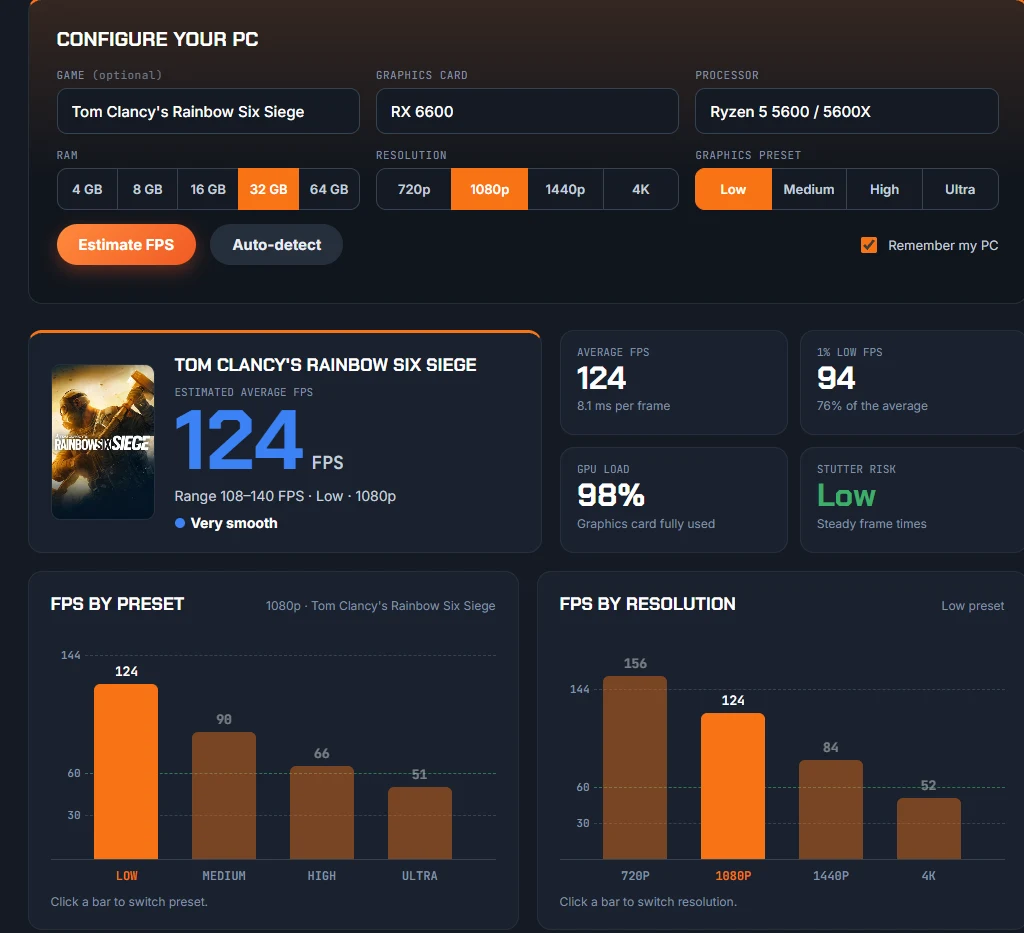
4. Check with the FPS Estimator
Our FPS Estimator works out, for your exact graphics card and processor, how many FPS each one can deliver in a game, and shows which one limits you at each resolution and preset, along with the expected GPU load and stutter risk.
When does the CPU become the bottleneck?
The same PC can be GPU-limited in one game and CPU-limited in another. The CPU matters most:
- At 1080p with a fast graphics card. The higher the resolution, the more the GPU becomes the limit; at 1080p a strong card often waits for the CPU.
- When chasing high FPS. Getting 60 FPS is easy for most processors; holding 144 to 240 FPS in shooters is CPU work.
- In CPU-heavy games: big multiplayer shooters (Counter-Strike 2, Battlefield, Call of Duty), MMOs, strategy and city builders, simulators, and open worlds with crowds.
- With low-res upscaling. DLSS or FSR in Performance mode renders at a low resolution, which shifts the load to the CPU.
- With slow or single-channel RAM. Memory speed feeds the CPU: RAM without XMP/EXPO, or a single stick, can create a CPU bottleneck on its own.
How to fix a CPU bottleneck
Try these in order, from free to paid:
- Turn on XMP or EXPO, and use two RAM sticks. Often the easiest free gain. Our guide How to Check Your PC Specs shows how to check your RAM speed.
- Lower CPU-heavy settings: crowd and NPC density, view distance, physics, shadows' distance and simulation quality. Graphics settings like textures or anti-aliasing won't help here.
- Use the GPU's spare power. If you are CPU-limited at 80 FPS anyway, raise the resolution, upscaling quality or graphics settings: you get a better image for free, at the same FPS.
- Cap your frame rate a little below what your CPU can hold. You lose a few peak frames but get much steadier frame times and less stutter.
- Close background apps (browser, downloads, recording software) that compete for the processor.
- Upgrade the processor if you still don't reach the FPS you want. On AM4, a Ryzen 7 5700X3D-class or Ryzen 5 5600 is a drop-in upgrade for older Ryzen chips; for a new platform, see Best Gaming CPUs in 2026.
More fixes for both kinds of bottleneck are in How to Increase FPS on PC.
How to fix a GPU bottleneck (if it bothers you)
If the graphics card is the limit and your FPS is too low:
- Lower the heaviest graphics settings (ray tracing, shadows, volumetric effects).
- Turn on upscaling (DLSS, FSR or XeSS).
- Lower the resolution if you have to.
- Upgrade the graphics card. See RTX 50 vs RX 9000 for every current card.
Which CPU goes with which graphics card?
A rough guide for a balanced gaming PC in 2026, at 1080p to 1440p. At 4K, a slower CPU is usually fine.
| Graphics card class | Balanced processor |
|---|---|
| RTX 3060, RTX 4060, RX 7600, RX 6600 | Ryzen 5 5600, Ryzen 5 7600, Core i5-12400 |
| RTX 5060 Ti, RX 9060 XT, RTX 4070 | Ryzen 5 9600X, Ryzen 5 7600X, Core i5-14600K |
| RTX 5070, RX 9070, RTX 4070 Super | Ryzen 5 9600X, Ryzen 7 7800X3D |
| RTX 5070 Ti, RX 9070 XT, RTX 5080 | Ryzen 7 7800X3D, Ryzen 7 9800X3D |
| RTX 5090 | Ryzen 7 9800X3D |
Want to compare your exact parts? Put your processor and the one you are considering side by side in Compare Hardware.
Don't trust "bottleneck calculator" percentages
Many sites give your PC a single number like "23% bottleneck". That number can't be right for every game: the same pair of parts is GPU-limited in Cyberpunk 2077 at 1440p and CPU-limited in Counter-Strike 2 at 1080p. A useful answer always depends on the game, the resolution and the settings, which is why our FPS Estimator shows the limit for each combination instead of one percentage.
FAQ
Is a CPU bottleneck bad for my PC?
No. It doesn't damage anything. It only means your graphics card can't reach its full performance in that game.
Is it normal for my GPU to be at 100%?
Yes. A graphics card at 95 to 100% in games is exactly what you want: you are using all the performance you paid for. Just keep an eye on temperatures.
My CPU usage is low but my FPS is low too. Why?
Total CPU usage hides the fact that games depend on one or two main threads. If one core is maxed and GPU usage is low, the CPU is still the bottleneck. Low FPS with both CPU and GPU usage low can also come from slow RAM, a frame cap, V-Sync or the game running on integrated graphics.
Will a better CPU increase my FPS?
Only if the CPU is your bottleneck. If GPU usage is already at 95 to 100%, a faster processor will barely change your FPS; a better graphics card will.
Does 4K reduce CPU bottleneck?
Yes. At 4K the graphics card does far more work per frame, so the processor rarely holds it back. It is why a mid-range CPU is usually fine for 4K gaming.
Based on how CPU and GPU limits work in games and on FpsGen's FPS Estimator model. Results vary by game, settings and drivers.

Gaming writer at FpsGen. Guides and reviews are built on official sources, patch notes and real player data.


Comments
No comments yet. Start the conversation.